


Description
Download Tools2Export PST Exporter – Free PST to EML, EMLX, PDF, MBOX, MSG, ICS, VCF Converter for Windows
Introducing Tools2Export PST Exporter: A Powerful PST Conversion Tool for Windows
In today’s digital workplace, managing email data efficiently is more critical than ever. For users relying on Microsoft Outlook, PST (Personal Storage Table) files serve as the backbone of email archives, contact lists, and calendar entries. However, when the need arises to migrate to a different email platform—such as Apple Mail, Gmail, or Thunderbird—converting these PST files becomes essential. Enter Tools2Export PST Exporter, a robust and user-friendly software designed specifically for Windows users to convert PST files into a wide range of modern formats including EML, EMLX, PDF, MBOX, MSG, ICS, and VCF. This tool stands out in the crowded field of file conversion utilities by offering both speed and precision, ensuring that no data is lost during the transition. Whether you're an individual managing personal emails or an IT professional handling bulk migrations, Tools2Export PST Exporter delivers a seamless experience. The software supports batch processing, allowing users to convert multiple PST files at once, which dramatically reduces time and effort. Even the free version provides access to convert up to 20 files, making it ideal for casual users or small-scale migrations. For those needing unlimited conversions, the premium version unlocks full functionality. What truly sets this tool apart is its commitment to data integrity—emails are preserved in PDF format with all original attributes intact, including sender, recipient, subject, date, and attachments. This level of accuracy is crucial for compliance, legal records, or archival purposes. With its intuitive interface and minimal learning curve, Tools2Export PST Exporter is a must-have utility for anyone working with Outlook data.
Key Features and Capabilities of Tools2Export PST Exporter
Tools2Export PST Exporter isn’t just another file converter—it’s a comprehensive email migration solution built with both functionality and reliability in mind. One of its standout features is its support for 10+ output formats, including industry-standard types like EML and MBOX for cross-platform compatibility, PDF for secure archiving, and MSG for individual email preservation. The ability to convert emails to PDF while retaining metadata such as headers, timestamps, and attachments ensures that your documents remain legally valid and fully traceable. Another major advantage is the batch conversion capability, which allows users to import multiple PST files simultaneously and process them in a single workflow. This is particularly beneficial for organizations undergoing large-scale email migrations or individuals with years of archived emails. The software also supports both personal and shared PST files, making it suitable for enterprise environments. Advanced filtering options let users select specific folders, dates, or senders for conversion, giving you granular control over what gets exported. Security is a top priority—Tools2Export PST Exporter uses encrypted processing to safeguard your data during conversion, ensuring no unauthorized access. Additionally, the tool maintains folder structures and subfolders, so your organized Outlook data remains intact in the new format. For users concerned about privacy, there’s no requirement to upload files to the cloud; all processing happens locally on your Windows PC. The interface is clean and modern, with clear navigation, progress indicators, and a preview function that lets you inspect converted files before finalizing. Whether you're migrating to a Mac, switching email clients, or preparing for data backup, Tools2Export PST Exporter offers the flexibility and power needed to handle complex conversion tasks with confidence.
How to Install and Use Tools2Export PST Exporter on Windows
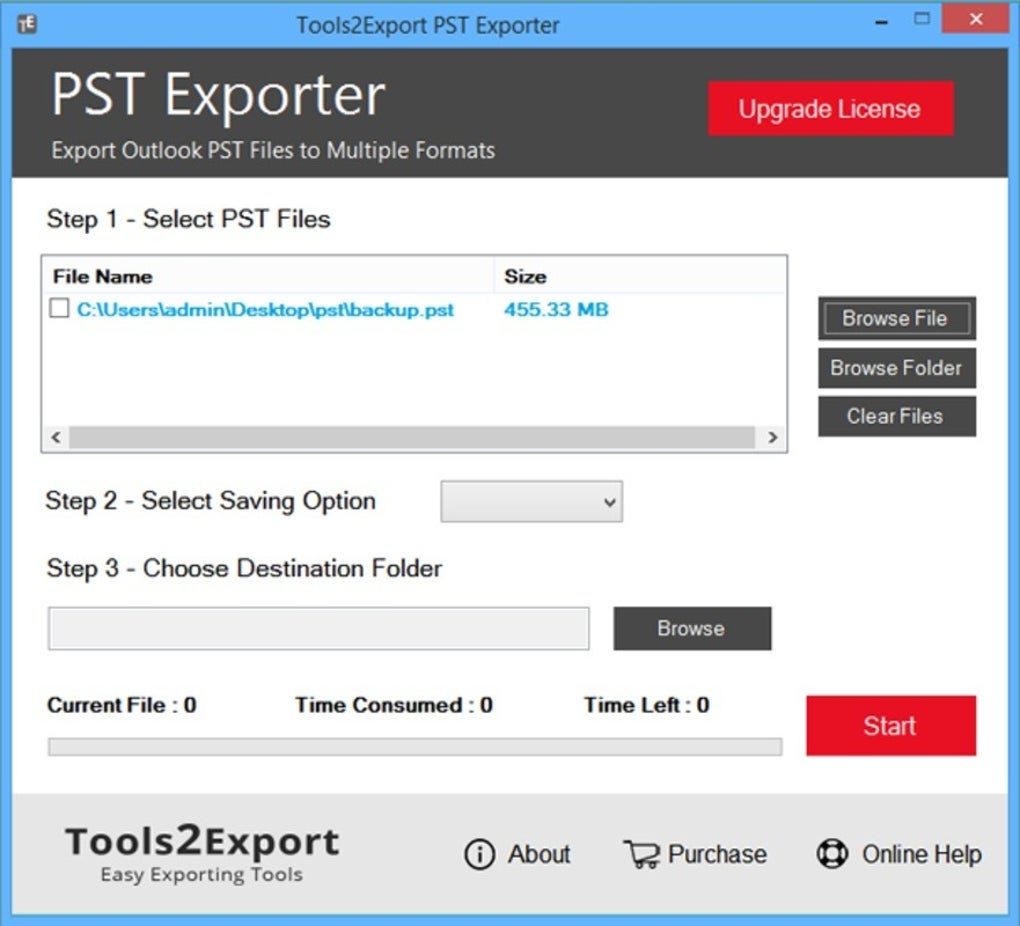
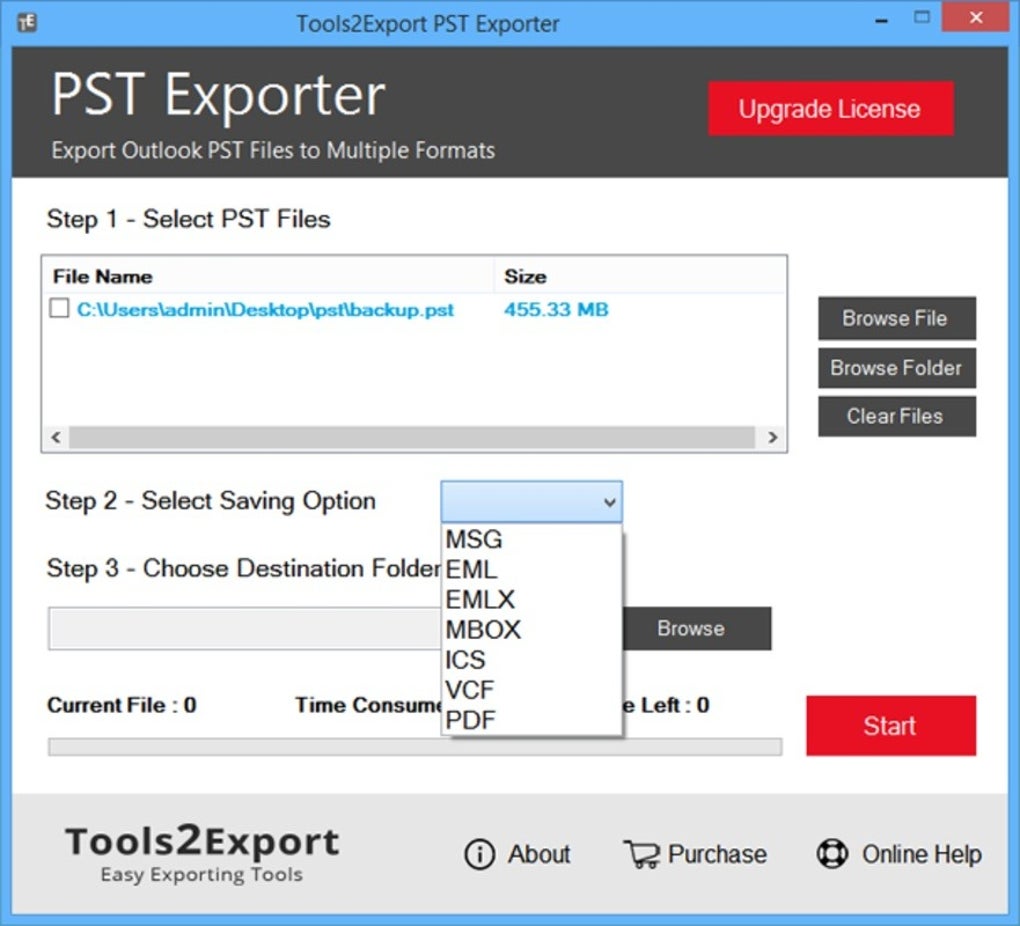
Getting started with Tools2Export PST Exporter is straightforward and requires minimal technical expertise. First, visit the official website and download the installer for your Windows system—compatible with Windows 10, 11, and earlier versions. The installation process is quick, typically taking less than a minute. Once installed, launch the application, and you’ll be greeted with a simple dashboard that guides you through the conversion workflow. To begin, click on the “Add Files” button and browse your computer to locate the PST file(s) you wish to convert. You can select multiple files at once, which is perfect for bulk processing. After adding your files, choose your desired output format from the dropdown menu—options include EML, EMLX, PDF, MBOX, MSG, ICS, and VCF. The software also lets you specify a destination folder for the converted files, giving you full control over file organization. If you're converting to PDF, ensure the “Preserve Metadata” option is enabled to maintain sender, recipient, subject, and date information. For advanced users, the tool offers filtering settings to include only specific folders, emails from a certain date range, or messages from a particular sender. Once configured, click “Start Conversion” and monitor the progress in real time. The tool provides detailed logs and completion notifications. After conversion, you can verify the output files using your preferred email client or PDF viewer. For users upgrading to the premium version, additional features like scheduled conversions, priority support, and enhanced filters become available. The software updates automatically, ensuring you always have the latest security patches and performance improvements. With no complex setup or command-line inputs, Tools2Export PST Exporter is accessible to both beginners and advanced users alike. It’s a secure, local tool that respects your data privacy and delivers fast, accurate results every time.
Compatibility, Pricing, and Why It’s a Top Choice for PST Conversion
Tools2Export PST Exporter is exclusively designed for Windows operating systems, making it a go-to solution for Outlook users on desktop platforms. It supports all major versions of Windows, including Windows 7, 8, 10, and 11, and is optimized for both 32-bit and 64-bit architectures. While it currently does not offer native versions for Mac, iOS, or Android, Windows users benefit from a fully localized, high-performance experience. The software is lightweight and doesn’t consume excessive system resources, ensuring smooth operation even on older machines. In terms of pricing, Tools2Export PST Exporter offers a freemium model that balances accessibility with premium features. The free version allows users to convert up to 20 PST files, which is sufficient for personal use or small migrations. For professionals, businesses, or those needing unlimited conversions, the premium version unlocks full functionality at a reasonable cost. The upgrade path is seamless, and your converted files remain compatible with the free version for viewing. One of the biggest advantages is that there’s no subscription fee—once purchased, you own the license. This makes it a cost-effective long-term solution compared to cloud-based alternatives that charge per conversion. The tool also includes regular updates that improve stability, add new formats, and enhance security. Compared to other PST conversion tools, Tools2Export stands out for its reliability, speed, and data integrity. It’s trusted by individuals, small businesses, and IT departments for its consistent performance. Whether you're converting emails for legal compliance, migrating to a new email provider, or archiving important correspondence, Tools2Export PST Exporter delivers a secure, efficient, and user-friendly experience. Its combination of powerful features, strong compatibility, and transparent pricing makes it one of the best PST conversion tools available today.
Pros and Cons: A Balanced Look at Tools2Export PST Exporter
- Pros:
- Supports conversion to 10+ formats including PDF, EML, MBOX, MSG, ICS, VCF
- Batch processing for multiple PST files at once
- Preserves metadata, folder structure, and attachments
- Free version allows conversion of up to 20 files
- Local processing ensures data privacy and security
- Intuitive, user-friendly interface
- Regular free updates and reliable performance
- Cons:
- Only available for Windows (no Mac, iOS, or Android support)
- Free version limits to 20 files (may not suit large-scale migrations)
- Limited customization in the free version
- No built-in email client integration
Frequently Asked Questions (FAQ)
Can I convert PST files to PDF with full metadata retention?
Yes, Tools2Export PST Exporter allows you to convert PST files to PDF while preserving all original email attributes such as sender, recipient, subject, date, and attachments. This ensures your PDFs remain accurate and legally compliant for archiving or sharing.
Is the software safe to download and use?
Absolutely. Tools2Export PST Exporter is a secure, local application that does not require uploading your data to the cloud. All processing happens on your Windows PC, ensuring your sensitive information remains private and protected.
Can I convert multiple PST files at once?
Yes, the software supports batch conversion, allowing you to select and convert multiple PST files simultaneously. This feature significantly speeds up the migration process for users with large email archives.
What’s the difference between the free and premium versions?
The free version allows conversion of up to 20 PST files. The premium version removes this limit, offering unlimited conversions, advanced filtering, and priority customer support. It’s ideal for businesses and heavy users.
Does Tools2Export PST Exporter work with Outlook 365?
Yes, the software is compatible with PST files created by Outlook 365, as well as older versions like Outlook 2010, 2013, 2016, and 2019. It reads both personal and shared PST files without issues.
Final Verdict: Why You Should Download Tools2Export PST Exporter Today
If you're looking for a reliable, secure, and efficient way to convert PST files on Windows, Tools2Export PST Exporter is an excellent choice. Whether you're switching email platforms, archiving important correspondence, or preparing for a data migration, this tool delivers on performance, accuracy, and ease of use. Its ability to convert to multiple formats while preserving data integrity makes it a standout in the field. With a free version that offers solid functionality and a premium upgrade for advanced needs, it caters to both casual users and professionals. The local processing ensures your data stays safe, and the batch conversion feature saves valuable time. For anyone working with Outlook data, this is a must-have utility. Download Tools2Export PST Exporter today and simplify your email conversion process with confidence.
Guides & Tutorials for Tools2Export PST Exporter
How to install Tools2Export PST Exporter
- Click the Preview / Download button above.
- Once redirected, accept the terms and click Install.
- Wait for the Tools2Export PST Exporter download to finish on your device.
How to use Tools2Export PST Exporter
This software is primarily used for its core features described above. Open the app after installation to explore its capabilities.
User Reviews for Tools2Export PST Exporter 0
No reviews found





